 SOSBY
SOSBYOn every Android brandWorldwide release · October 2026
Your loved ones see and hear you.For the whole alert.
Seven presses on the power button, phone in your pocket. Your loved ones get live photos and sound; their phones ring even on silent, and they reply. By text message when the internet drops. On every Android brand.
15 days free, no card needed, no commitment.
Other languages
Every Android phone, even entry-level ones
- Samsung
- Xiaomi
- Redmi
- POCO
- Oppo
- Realme
- OnePlus
- Motorola
- Google Pixel
- Honor
- vivo
- Tecno
- Infinix
- Nokia
Android 7 or newer, with Google Play services. Not on iPhone yet.
Your phone has an SOS feature. It can’t do this.
Many phones already have an SOS feature: a few presses, a location, sometimes a few seconds of sound or a video. SOSBY adds what lets your loved ones act — and works the same way on every brand.

They see. They hear. Right to the end.
A photo from each camera every 20 seconds and sound in 10-second clips, for the whole alert — not just a few seconds at the start. Without you lifting a finger.
On silent, it still rings for them.
The alert rings at alarm volume, even on silent. Your loved ones reply with one tap — “Seen”, “Calling”, “On my way” — and everyone sees who is doing what.
No internet? Texts keep going.
Car park, cellar, countryside, out of data: your position keeps going out by text message. Photos and sound wait until the data is back.
You fall. The alert goes by itself.
Turn on fall detection: if you don’t get up, a 30-second countdown gives you time to cancel, then your circle is alerted.
Parents stay in control.
A parent requests their child’s position and knows whether the phone responded. A minor’s account can’t leave its circle or stop its own alert.
No need for the latest model.
From Android 7, on every brand: Samsung, Xiaomi, Oppo, Motorola, Pixel, Honor, vivo, Tecno… A basic phone for school is enough. The guided setup speaks each brand’s language.
SOSBY versus your phone’s built-in SOS feature
Naming no one: what SOSBY does, and what a built-in SOS feature doesn’t do, or only on some models.
| During an alert | SOSBY | Built-in SOS feature |
|---|---|---|
| Photos from both cameras and sound, for the whole alert | Yes | Depends on the model: a few photos, a few seconds of sound or a video |
| On your loved ones’ phones, the alert rings even on silent | Yes | No: just a message |
| They answer “Seen”, “Calling”, “On my way” — everyone sees who is doing what | Yes | No |
| Your position live on a map, every 15 seconds | Yes | Depends on the model |
| A link for emergency services: map, photos and sound, live | Yes | No |
| A parent locates their child, who cannot stop their own alert | Yes | No |
| Fall detection on the phone | Yes | Depends on the model |
| The same behaviour on every Android brand, from Android 7 | Yes | No: each brand does it its own way |
15 days free, no card needed, no commitment.
For you. And for everyone you love.
One circle looks after the whole family. Receiving an alert costs nothing: your loved ones pay nothing to look out for you.
Your child
The walk home from school, the first party. Seven presses in their pocket, and you see and hear where they are.
Your elderly parents
Alone at home, a fall on the stairs. With fall detection, the alert goes out even if they can no longer press.
Your partner
Coming home late from work, driving at night. They choose to raise the alert — and you know instantly.
Your brother, your sister
A night out gone wrong, a trip, a hike. Even far away, the circle is there.
You
Followed in the street, feeling faint in a car park. Without taking out your phone, without a word.
Go get help, SOSBY!
An abduction, a collapse, someone who wanders off. SOSBY is a St Bernard: when help is needed he answers, and he sets off at once — to the people close to you. And it is they who, with one press, send him to fetch the emergency services.
This is what the people close to you hear when you trigger an alert. It rings at alarm volume — even on a phone set to silent.
The moment a phone stops being any use
What puts you in danger is not being without a phone. It is holding one and being able to do nothing with it.



As seen on social media
The clip. Nothing loads until you press play.
See it, rather than take my word for it
Eight screens from the app, exactly as they are. Press the button under the phone.
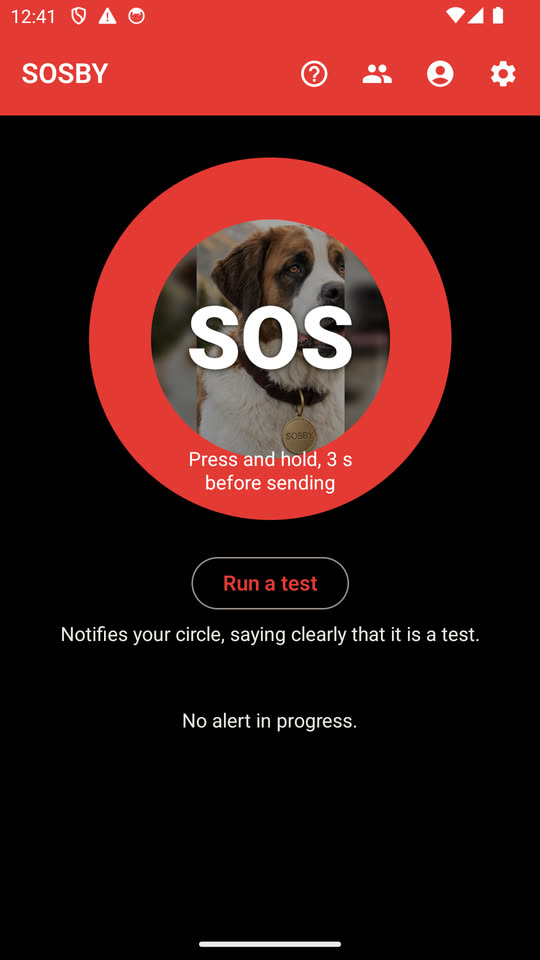
The button
A three-second press — or seven presses on the power button, without even taking the phone out of your pocket.
Next screen →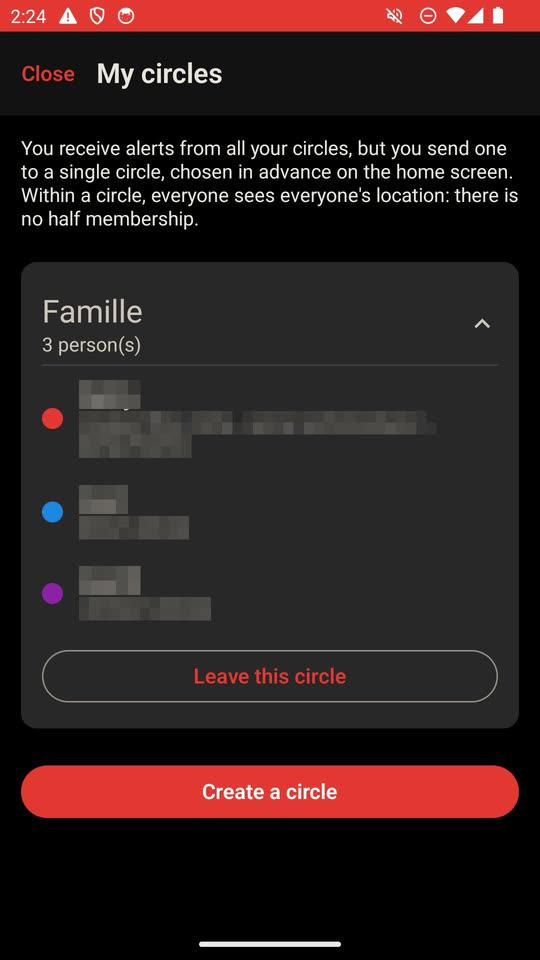
Your circle
The people who will be told, chosen one by one. Nobody else sees anything at all — the numbers are masked here, not in the app.
Next screen →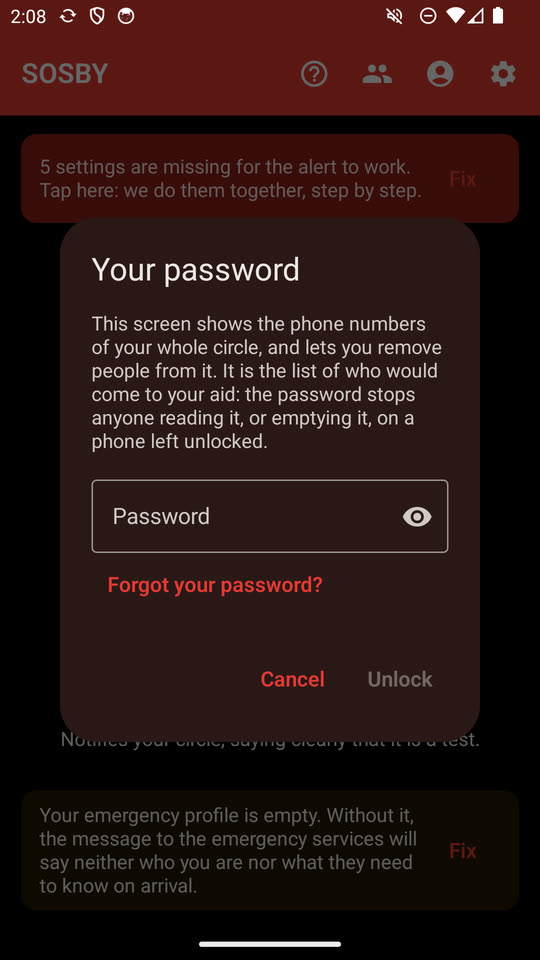
The lock
That list sits behind your password. A phone left open does not give it up, and does not let anyone empty it.
Next screen →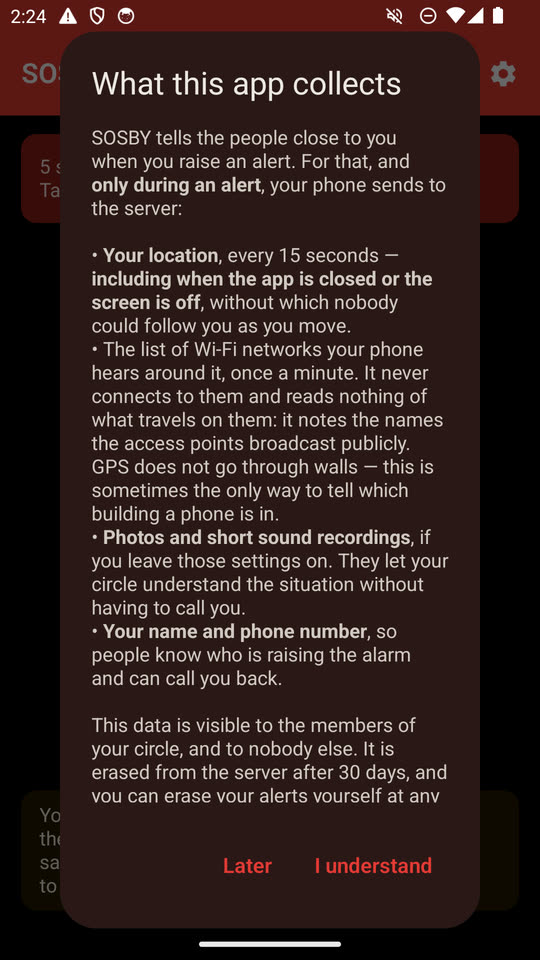
What is collected
Written out in plain words before the first alert, not buried in terms nobody reads.
Next screen →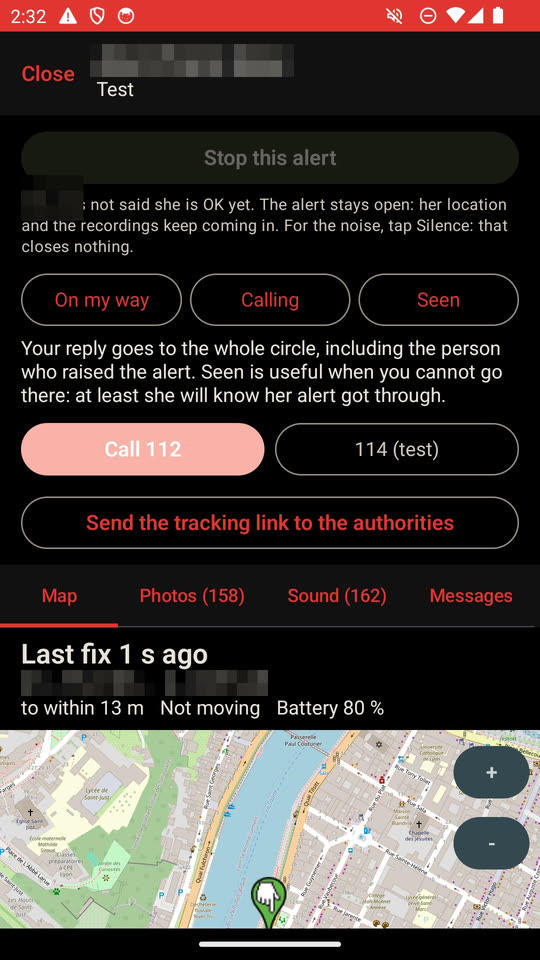
What your circle sees
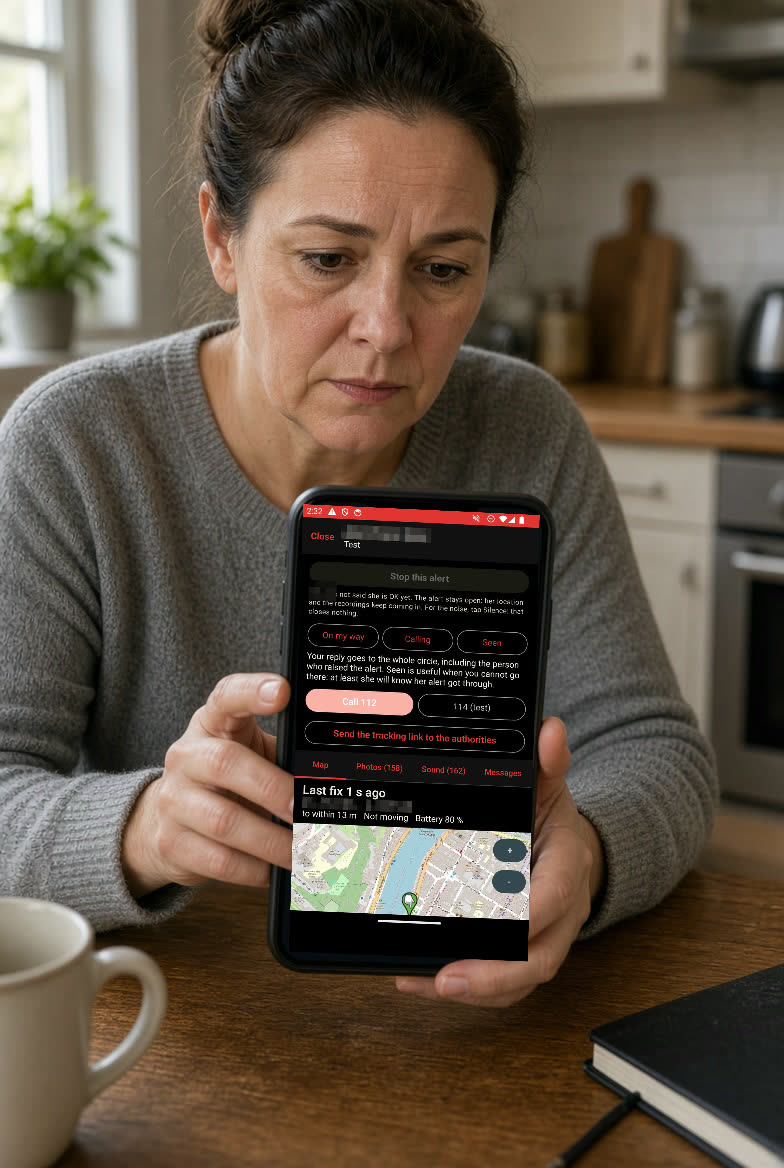
The position refreshing, the accuracy it states, the battery going down. And the tracking link to send to the authorities, in one tap.
Next screen →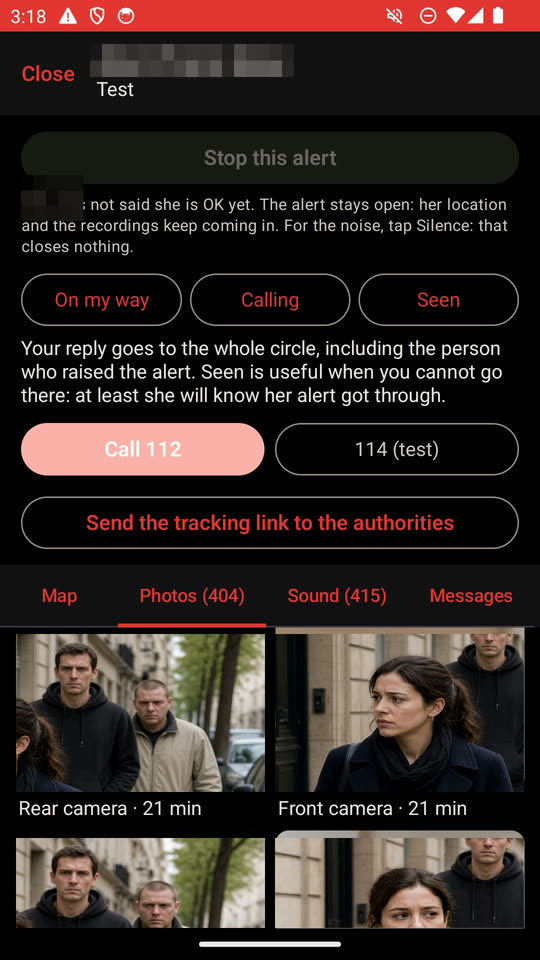
The photos arrive on their own
Both lenses, every 20 seconds, timed from the very first one. The two photos shown here are illustrations taken from the clip, in place of real captures.
Next screen →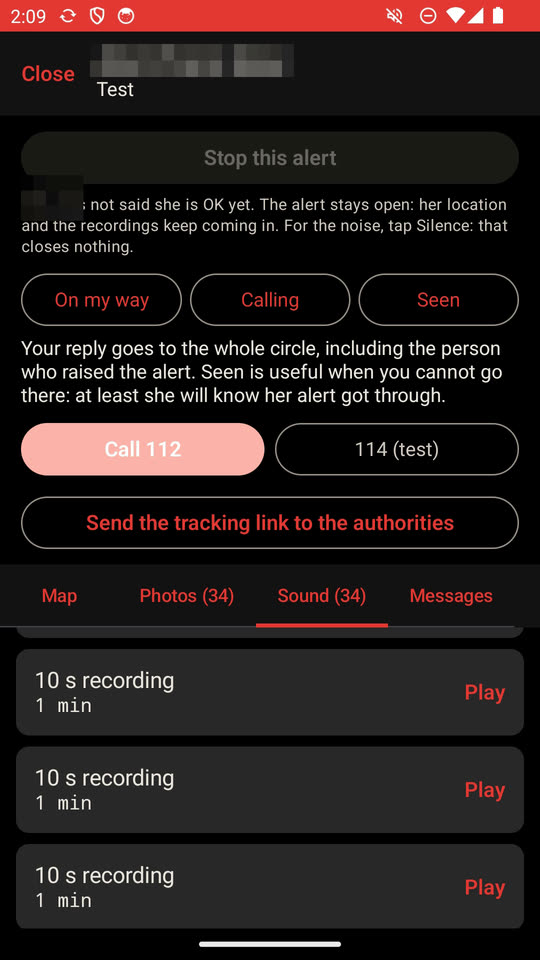
And the sound
The microphone records in 10-second slices, timestamped from the start. A voice, a car door, a name spoken out loud: what no position will ever tell you.
Next screen →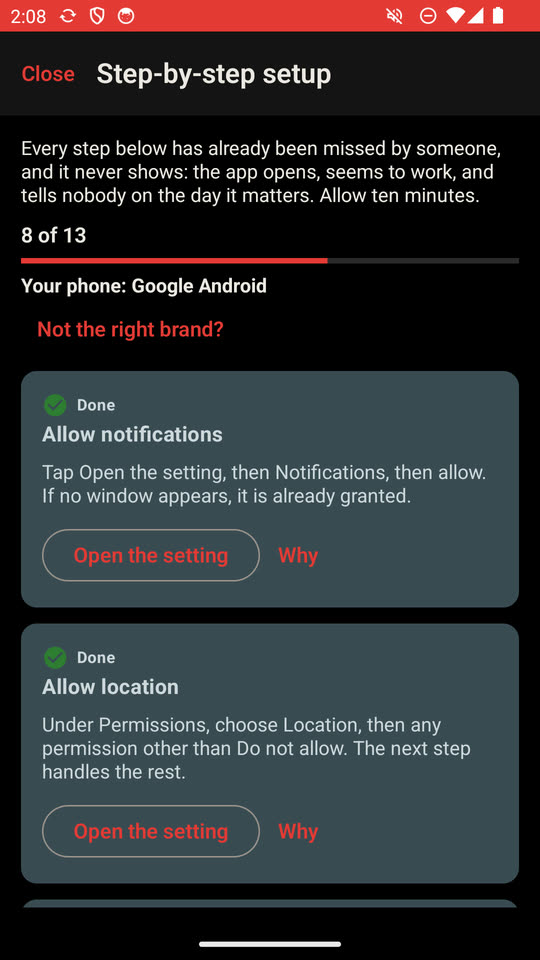
Setting it up
Ten guided steps, one at a time. Every one of them has already been missed by someone, and it never shows until the day it matters.
Back to the start →The emergency services, the moment your circle decides
It is not automatic: someone following your alert tells them, from the alert screen. They already have the map in front of them, the photos, and they hear what is going on: they are the one who judges. The app never calls anyone on its own — an alert raised for nothing costs a crew to someone who needed it.
In France: 114, with one press
114 is the French emergency service that answers by text message. With one press, your relative sends the message from YOUR phone — not a server, not theirs — with your details (name, health, description, the people already warned) and the tracking link. So 114 can answer you, the only channel left when speaking is impossible or dangerous; as soon as it replies, your circle knows.
Elsewhere: call the emergency services, and give them the link
114 only exists in France. Anywhere else, your relative’s screen shows the emergency number of the country you are in — 112 across Europe — and they call it. Then they give the tracking link to the operator, or email it to them, with one press, from the app.
The tracking link: they see everything, without asking
A web page opens for the emergency services the live map, the photos and the sound, with nothing to install. And once they have been told, they alone can close the alert.
And every other day
SOSBY is not only for the minutes that frighten you.
A lost or stolen phone
From another device, a web page and your password: the phone gives up its position, photos and sound, silently. It only ever captures your own.
Knowing where your child is
A parent asks for the position. The phone answers — and the parent knows whether it answered, instead of staring at an empty map.
A disappearance
The family reports someone missing: their phone captures without the screen showing anything at all, and the message the family sends to the emergency services carries everything they need to come quickly — who you are, where you are, and what will guide them to you.
Silence, on purpose
During an alert, the notification on your phone says nothing about what is happening: whoever is holding you and looking at your screen must not learn that you called for help.
A password in front of “Stop”
Your alert cannot be closed by taking your phone from you: it takes your password. The authorities can — from the link they were sent, which never needs your phone at all.
A file for the authorities
Under a judicial order, everything captured is handed over time-stamped, and every handover is written into the log.
Let a loved one locate you
Only if you decide it: the person you choose asks for your position, 30 minutes at a time, and nothing is kept.
What you are telling yourself right now
“My phone already has an SOS feature.”
Depending on the brand, it calls emergency services or sends your location to a few contacts, sometimes with a few seconds of sound. SOSBY adds the rest: photos and sound for the whole alert, loved ones whose phones ring and who reply, your position by text message when the internet drops — on every Android brand.
“I am never in danger.”
So far. And that is not all this is for: a stolen phone, a teenager who does not come home, an elderly parent who stops answering. Those days come to everyone.
“It will spy on me and drain my battery.”
Nothing is captured until something is triggered. And what is captured goes to the people you chose, one by one. Nobody else sees it — except the authorities, if a judge asks for it, and every hand-over is then written into the log.
“My family would not know what to do.”
They do not need to know anything. They see the map, they see the photos, they hear — and one press sends the lot to the emergency services: the link, your details, your position. That is the only thing asked of them.
Three minutes, once and for all
Install it
An account, a first name, an email address and your date of birth. No card.
Build your circle
Family, friends, the people close to you. They are the ones — and no one else — who will be told.
Forget about it
It asks for nothing, it makes no noise, it never reminds you it is there. It is there for the day you need it.
The day you need it, it will be too late to install it
It takes three minutes, today, quietly, on a sofa. Fifteen days to put all of it to the test, with no card, and nothing to cancel if you stop.
Fifteen days to put it to the test
Everything is open for fifteen days — no card, no commitment, and nothing to cancel if you stop. After that it takes a subscription: without one, pressing SOS and sending your position to your circle stay free, but the photos, the sound, finding your phone and the message to the emergency services close.
If you can speak, call
SOSBY shows where you are and puts everything it captured in front of the emergency services, but it is not an emergency service: nobody picks up at the other end of the app, and it is someone close to you who decides to call them. When your voice works, calling your emergency number is still faster. SOSBY is built for the times when it does not.
Tell me when it is out
Only one thing will ever be sent to you: the message announcing the release. No newsletter, no advertising, and your address goes to nobody.